
How to add inline related posts on WordPress easily
Adding inline related posts on WordPress is useful for improving SEO and increasing user engagement, as it allows you to guide readers toward other relevant content, making navigation smoother and more effective.
Unlike classic related posts placed at the end of the page, inline related posts are integrated within paragraphs, making them much more visible and effective.
What are inline related posts
Inline related posts are links inserted directly within the content of an article.
This allows you to capture the user’s attention while they are reading, increasing the chances of clicks to other content on the site.
From an SEO perspective, this technique improves the distribution of internal links and helps search engines better understand the structure of the website, leading to improved indexing.
Why add inline related posts on WordPress
Integrating related content within articles allows you to guide users during their reading experience by suggesting relevant content at the right moment.
This approach improves user experience and increases the time spent on the site.
From a strategic point of view, a well-structured internal linking strategy helps strengthen the most important pages and effectively distribute SEO authority across the website.
How to add inline related posts on WordPress
To effectively add inline related posts, it is recommended to use a dedicated plugin.
Our plugin Internal Linking of Related Contents allows you to fully automate the process, avoiding manual work on each individual article.
After downloading the plugin from the official WordPress repository, simply activate it to start using it.
Once installed and activated, you will find a dedicated section in the admin panel where you can manage all settings.
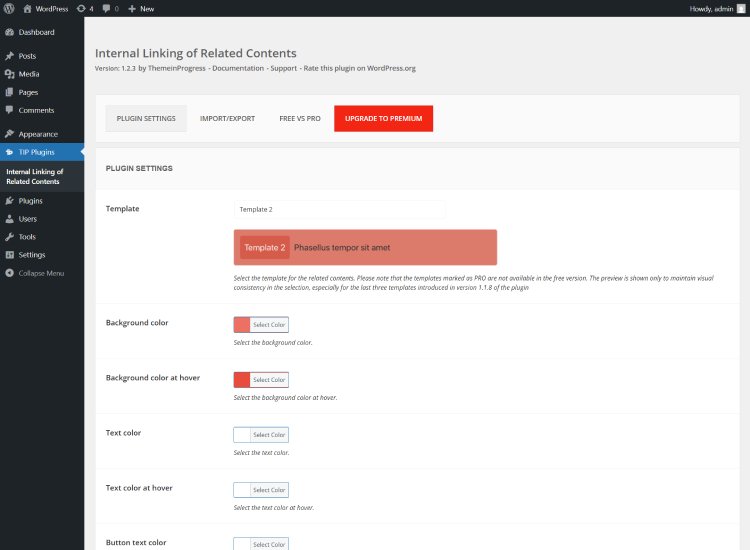
After completing the configuration, the plugin will start adding related posts within each article based on the selected settings.
This process happens without modifying the original content stored in the database, ensuring maximum flexibility and safety.
Plugin configuration
After activation, the plugin allows you to control the behavior of related posts in a simple but effective way.
You can easily manage the frequency and number of related posts that will be included within your content.
The selection can be based on categories and tags, allowing you to maintain strong topical relevance between linked content.
Free version of the plugin
The free version of Internal Linking of Related Contents, available in the official WordPress repository, is already sufficient to implement an effective internal linking strategy.
This solution is particularly suitable for blogs and editorial websites that want to improve their internal linking structure without additional costs.
Premium version
The premium version of the plugin offers advanced features designed for those who want a more advanced SEO strategy.
It allows more precise selection of related content through custom keywords, provides a greater number of templates, enables related content in more flexible ways, includes AMP support, and, starting from version 1.4.1, introduces the AI Engine feature to automatically improve related content suggestions.
For instructions on configuring and using the AI Engine, please refer to the online documentation:
https://demo.themeinprogress.eu/internal-linking-related-contents-pro/how-to-configure-and-use-the-ai-engine/
Conclusion
Knowing how to add inline related posts on WordPress allows you to significantly improve both SEO and user experience.
A well-structured internal linking strategy helps increase content visibility, improve navigation, and effectively distribute authority across the website.
By using a plugin like Internal Linking of Related Contents, you can automate the entire process without having to manually edit each article.